
6. 🧠 MISAW CNN classification


This notebook is intended to use CNN to classify phases, steps, etc in data from the MISAW dataset, commonly used for computer vision and machine learning tasks. It covers:
Creating pytorch Dataset
Exploring options of CNN
Visualize training and validation results
🧰 Importing Required Libraries
This section loads essential Python libraries like os, cv2, glob, and pandas which are needed for handling files, images, and data manipulation.
[1]:
# 📦 Install dependencies
!pip install pytorch-lightning -q
!pip install torchmetrics -q
   ━━━━━━━━━━━━━━━━━━━━━━━━━━━━━━━━━━━━━━━━ 823.0/823.0 kB 34.1 MB/s eta 0:00:00
   ━━━━━━━━━━━━━━━━━━━━━━━━━━━━━━━━━━━━━━━━ 363.4/363.4 MB 4.0 MB/s eta 0:00:00
   ━━━━━━━━━━━━━━━━━━━━━━━━━━━━━━━━━━━━━━━━ 13.8/13.8 MB 88.8 MB/s eta 0:00:00
   ━━━━━━━━━━━━━━━━━━━━━━━━━━━━━━━━━━━━━━━━ 24.6/24.6 MB 69.3 MB/s eta 0:00:00
   ━━━━━━━━━━━━━━━━━━━━━━━━━━━━━━━━━━━━━━━━ 883.7/883.7 kB 28.0 MB/s eta 0:00:00
   ━━━━━━━━━━━━━━━━━━━━━━━━━━━━━━━━━━━━━━━━ 664.8/664.8 MB 1.6 MB/s eta 0:00:00
   ━━━━━━━━━━━━━━━━━━━━━━━━━━━━━━━━━━━━━━━━ 211.5/211.5 MB 6.0 MB/s eta 0:00:00
   ━━━━━━━━━━━━━━━━━━━━━━━━━━━━━━━━━━━━━━━━ 56.3/56.3 MB 13.3 MB/s eta 0:00:00
   ━━━━━━━━━━━━━━━━━━━━━━━━━━━━━━━━━━━━━━━━ 127.9/127.9 MB 7.5 MB/s eta 0:00:00
   ━━━━━━━━━━━━━━━━━━━━━━━━━━━━━━━━━━━━━━━━ 207.5/207.5 MB 5.6 MB/s eta 0:00:00
   ━━━━━━━━━━━━━━━━━━━━━━━━━━━━━━━━━━━━━━━━ 21.1/21.1 MB 82.6 MB/s eta 0:00:00
   ━━━━━━━━━━━━━━━━━━━━━━━━━━━━━━━━━━━━━━━━ 961.5/961.5 kB 44.4 MB/s eta 0:00:00
[2]:
# Standard library
import os           # For file and directory operations
import glob         # For finding files using wildcard patterns
import json         # For saving annotations in JSON format
import shutil       # For copying images

# Third-party libraries
import cv2
import numpy as np
import pandas as pd
import matplotlib.pyplot as plt

# PyTorch
import torch
from torch import nn
from torch.utils.data import DataLoader, random_split

# Torchvision
from torchvision import datasets, transforms

# PyTorch Lightning
import pytorch_lightning as pl
from pytorch_lightning import LightningModule, Trainer
from pytorch_lightning.callbacks import EarlyStopping, ModelCheckpoint
from pytorch_lightning.loggers import TensorBoardLogger

# Torchmetrics
import torchmetrics
📥 Downloading the Dataset
Here we download the MISAW dataset in .zip format from a Dropbox link. This dataset contains videos and annotations for surgical workflow analysis.
[3]:
!wget -O MISAW.zip https://www.dropbox.com/scl/fi/psmlokrc5ms958ggqyv3u/MISAW.zip?rlkey=v91dz437npon5zz10olrbcqcd&st=54qvf31m&dl=0
--2025-04-24 11:36:28--  https://www.dropbox.com/scl/fi/psmlokrc5ms958ggqyv3u/MISAW.zip?rlkey=v91dz437npon5zz10olrbcqcd
Resolving www.dropbox.com (www.dropbox.com)... 162.125.71.18, 2620:100:6018:18::a27d:312
Connecting to www.dropbox.com (www.dropbox.com)|162.125.71.18|:443... connected.
HTTP request sent, awaiting response... 302 Found
Location: https://uca1165cde9707ef0b306f96e779.dl.dropboxusercontent.com/cd/0/inline/CoYKvzmExC6e_G8tIlRWyKIt5JPmSMa-Me9WKN9i8DVF43OcwzLCQJt-zRqFFJCPctzL2N9bTNGZKnvSmc4HhPWTHElrvxdz1Q11OVHVZDpC9AhWp8PQbEK1P3HIKO8mQZPonPHckPQF-Af3KBKbo--Y/file# [following]
--2025-04-24 11:36:29--  https://uca1165cde9707ef0b306f96e779.dl.dropboxusercontent.com/cd/0/inline/CoYKvzmExC6e_G8tIlRWyKIt5JPmSMa-Me9WKN9i8DVF43OcwzLCQJt-zRqFFJCPctzL2N9bTNGZKnvSmc4HhPWTHElrvxdz1Q11OVHVZDpC9AhWp8PQbEK1P3HIKO8mQZPonPHckPQF-Af3KBKbo--Y/file
Resolving uca1165cde9707ef0b306f96e779.dl.dropboxusercontent.com (uca1165cde9707ef0b306f96e779.dl.dropboxusercontent.com)... 162.125.71.15, 2620:100:6022:15::a27d:420f
Connecting to uca1165cde9707ef0b306f96e779.dl.dropboxusercontent.com (uca1165cde9707ef0b306f96e779.dl.dropboxusercontent.com)|162.125.71.15|:443... connected.
HTTP request sent, awaiting response... 302 Found
Location: /cd/0/inline2/CobK69GrQPE-YOmPc25B-gXPNmu7CwNs2obdDL4QCy9tHi_HDessh7IQcqvD-bSQLGOp016Q6PPW4XlNpXTLauPcP0Q7Dzqasuw5qFEG9jpIefz3d3Z-xxIsStIMGXPI_QFgzSaIbskp5O9qndmXWUR2XMNuwwiFJP4yLGCN_p6G2I4kmekoIaASRQOCQelwkYMP0CAI3JHafqc5euhPoGVRW10NAYYE7QVrDUxwjw0qbaziHdtckFD9U_2_pnWPS9izHvZeeBTukFBMmYULr5Ku4zblUCrQAG_RQtFmzEIXXtf-KB3oj7wemH93NF0sqkZcJtjQfJ9k_9-3ixd5bws2BuXAXptWwEMALuRi_tuVctOYg5YOvQFxB8wGS9CwK60/file [following]
--2025-04-24 11:36:30--  https://uca1165cde9707ef0b306f96e779.dl.dropboxusercontent.com/cd/0/inline2/CobK69GrQPE-YOmPc25B-gXPNmu7CwNs2obdDL4QCy9tHi_HDessh7IQcqvD-bSQLGOp016Q6PPW4XlNpXTLauPcP0Q7Dzqasuw5qFEG9jpIefz3d3Z-xxIsStIMGXPI_QFgzSaIbskp5O9qndmXWUR2XMNuwwiFJP4yLGCN_p6G2I4kmekoIaASRQOCQelwkYMP0CAI3JHafqc5euhPoGVRW10NAYYE7QVrDUxwjw0qbaziHdtckFD9U_2_pnWPS9izHvZeeBTukFBMmYULr5Ku4zblUCrQAG_RQtFmzEIXXtf-KB3oj7wemH93NF0sqkZcJtjQfJ9k_9-3ixd5bws2BuXAXptWwEMALuRi_tuVctOYg5YOvQFxB8wGS9CwK60/file
Reusing existing connection to uca1165cde9707ef0b306f96e779.dl.dropboxusercontent.com:443.
HTTP request sent, awaiting response... 200 OK
Length: 965450623 (921M) [application/zip]
Saving to: ‘MISAW.zip’

MISAW.zip           100%[===================>] 920.72M  20.4MB/s    in 35s

2025-04-24 11:37:06 (26.2 MB/s) - ‘MISAW.zip’ saved [965450623/965450623]
📦 Extracting the Dataset
This cell unzips the downloaded file to access the raw data.
[4]:
!unzip -qq MISAW.zip
🎞️ Frame Extraction from Videos
This section reads the videos and extracts every N-th frame (controlled by resample_rate). Each video gets its own subdirectory of frames, organized as:
MISAW/
  └── train/
        └── Frames/
              └── <video_id>/frame_0000.jpg
These images will be later paired with annotations.
[5]:
import os
import cv2  # OpenCV is used for handling video files and frame extraction

# ----------------------------------------
# 1. Configuration
# ----------------------------------------

# Choose how often to save a frame (e.g., every 120th frame)
# A higher number results in fewer frames being saved. Start high for fast testing.
resample_rate = 30

# Path to the folder containing input videos
video_folder = 'MISAW/train/Video'

# Path where extracted frames will be saved
frames_folder = 'MISAW/train/Frames'

# Create the frames folder if it doesn't exist
os.makedirs(frames_folder, exist_ok=True)


# ----------------------------------------
# 2. Process each video file in the folder
# ----------------------------------------

for video_file in os.listdir(video_folder):
    # Check for supported video formats
    if video_file.endswith(('.mp4', '.avi', '.mov')):
        video_path = os.path.join(video_folder, video_file)  # Full path to video file
        video_name = os.path.splitext(video_file)[0]         # Extract video name without extension

        # Create a subfolder for the frames of this video
        video_frames_path = os.path.join(frames_folder, video_name)
        os.makedirs(video_frames_path, exist_ok=True)

        # Open the video file
        cap = cv2.VideoCapture(video_path)

        # Counters to keep track of frames read and saved
        frame_count = 0      # Total number of frames read
        saved_count = 0      # Number of frames saved

        # ----------------------------------------
        # 3. Read frames one-by-one
        # ----------------------------------------

        while True:
            success, frame = cap.read()  # Read one frame
            if not success:
                break  # End of video

            # Save every N-th frame (based on resample_rate)
            if frame_count % resample_rate == 0:
                # Save frame with a 4-digit padded name (e.g., frame_0001.jpg)
                # `:04d` formats the integer with 4 digits, padded with zeros
                frame_name = f"frame_{saved_count:04d}.jpg"

                # Full path to save the frame
                frame_path = os.path.join(video_frames_path, frame_name)

                # Save the frame as an image file
                cv2.imwrite(frame_path, frame)

                # Increment saved frame counter
                saved_count += 1

            # Increment total frame counter
            frame_count += 1

        # Release the video capture object
        cap.release()

        # Print a summary for this video
        print(f"Saved {saved_count} frames from {video_file}")

# ----------------------------------------
# 4. Final message
# ----------------------------------------

print("Done!")
Saved 194 frames from 3_3.mp4
Saved 398 frames from 2_2.mp4
Saved 141 frames from 6_4.mp4
Saved 127 frames from 6_1.mp4
Saved 202 frames from 6_3.mp4
Saved 199 frames from 2_6.mp4
Saved 432 frames from 2_5.mp4
Saved 185 frames from 1_2.mp4
Saved 332 frames from 1_4.mp4
Saved 157 frames from 3_2.mp4
Saved 250 frames from 2_4.mp4
Saved 313 frames from 2_1.mp4
Saved 242 frames from 6_2.mp4
Saved 489 frames from 2_3.mp4
Saved 145 frames from 3_1.mp4
Saved 228 frames from 1_3.mp4
Saved 252 frames from 1_1.mp4
Done!
🧾 Parsing Annotations and Building Frame-Label Pairs
Here we parse the .txt annotation files (one per video) to extract surgical phases, then pair each extracted frame with a corresponding label. We also map textual phase labels to numeric IDs, which is important for training machine learning models.
[6]:
# Folder where the annotation .txt files are stored (one per video)
annotation_folder = 'MISAW/train/Procedural decription'

# Folder where extracted frames from videos are stored (in subfolders per video)
frames_folder = 'MISAW/train/Frames'

# This is the same rate you used to extract frames from videos (e.g., every 120th frame)
# It must match or your labels won't align with the frames!

# --- Collect all unique phases first ---

# We'll store all unique phase labels (like "Idle", "Suturing", etc.) in this set
all_phases = set()

# Find all annotation files in the folder (e.g., 1_1_annotation.txt, 1_2_annotation.txt, etc.)
annotation_files = sorted(glob.glob(os.path.join(annotation_folder, '*_annotation.txt')))

# Loop through each annotation file and collect unique phase names
for anno_file in annotation_files:
    df = pd.read_csv(anno_file, sep='\t')  # Load the .txt file into a DataFrame
    all_phases.update(df['Phase'].unique())  # Add unique phases to the set

# Create a dictionary to map each phase string to a unique integer ID
# Useful for training machine learning models
phase_to_id = {name: i for i, name in enumerate(sorted(all_phases))}

# Create the inverse mapping (ID to phase name) for visualization later
id_to_phase = {i: name for name, i in phase_to_id.items()}


# --- Build (frame_path, label) pairs ---

# This list will hold tuples like: ("path/to/frame.jpg", 2) → (frame, label_id)
all_data = []

# Go through each annotation file (one per video)
for anno_file in annotation_files:
    # Extract the video ID from the filename (e.g., "1_1_annotation.txt" → "1_1")
    video_id = os.path.basename(anno_file).replace('_annotation.txt', '')

    # Construct the path to the corresponding frame folder
    frame_dir = os.path.join(frames_folder, video_id)

    # Read the annotation file into a DataFrame
    df = pd.read_csv(anno_file, sep='\t')

    # Get the full list of phases (one per original video frame)
    phases = df['Phase'].tolist()

    # Resample: only keep every N-th label (e.g., every 120th label)
    sampled_phases = phases[::resample_rate]

    # Convert phase strings to numeric labels using our earlier mapping
    sampled_ids = [phase_to_id[p] for p in sampled_phases]

    # Get the list of frame image paths, sorted so they match the order of labels
    frame_paths = sorted(glob.glob(os.path.join(frame_dir, '*.jpg')))

    # Sanity check: if the number of frames doesn’t match the number of labels, skip this video
    if len(frame_paths) != len(sampled_ids):
        print(f"⚠️ Mismatch for {video_id}: {len(frame_paths)} frames vs {len(sampled_ids)} labels")
        continue

    # Add all (frame_path, label_id) pairs to our global list
    all_data.extend(zip(frame_paths, sampled_ids))


# Final print to confirm total number of samples loaded
print(f"✅ Total samples: {len(all_data)}")
✅ Total samples: 4286
Visualize images and phases
[7]:
import random
import matplotlib.pyplot as plt
from PIL import Image
from collections import defaultdict

# CONFIGURATION

# Number of sample images to display per phase (i.e., class/label)
samples_per_phase = 3

# Create a dictionary to group image paths by their label (phase ID)
# defaultdict(list) automatically creates an empty list for new keys
label_to_paths = defaultdict(list)

# all_data is assumed to be a list of (frame_path, label_id) pairs
# Here we organize all frame paths under their respective label IDs
for path, label_id in all_data:
    label_to_paths[label_id].append(path)

# Determine the number of unique phases (rows in the final plot)
n_rows = len(label_to_paths)

# Number of columns equals the number of samples we want to show per phase
n_cols = samples_per_phase

# Create a grid of subplots (n_rows x n_cols)
# figsize sets the overall size of the figure (in inches)
fig, axes = plt.subplots(n_rows, n_cols, figsize=(4 * n_cols, 4 * n_rows))

# Add a main title above all the subplots
fig.suptitle("Random Samples per Phase", fontsize=18)

# Get all label IDs in sorted order (for consistent row display)
sorted_labels = sorted(label_to_paths.keys())

# Loop over each row (i.e., each unique label/phase)
for row, label_id in enumerate(sorted_labels):
    # Convert label ID back to its readable name using id_to_phase mapping
    label_name = id_to_phase[label_id]

    # Randomly sample a few images from this label
    # Ensure we don't try to sample more images than we actually have
    samples = random.sample(label_to_paths[label_id], min(samples_per_phase, len(label_to_paths[label_id])))

    # For each column (i.e., each sampled image for this label)
    for col in range(samples_per_phase):
        # Access the correct subplot (row x col)
        # If there's only one row, axes may be 1D
        ax = axes[row, col] if n_rows > 1 else axes[col]

        # Only plot if we have enough samples for this column
        if col < len(samples):
            # Open the image file using PIL
            img = Image.open(samples[col])

            # Display the image in the subplot
            ax.imshow(img)

            # Set the subplot title to the phase name
            ax.set_title(f"{label_name}", fontsize=10)

        # Remove axis ticks and labels for a cleaner look
        ax.axis('off')

# Adjust layout to prevent overlaps
plt.tight_layout()

# Adjust top spacing to make room for the main title
plt.subplots_adjust(top=0.95)

# Display the final grid of images
plt.show()
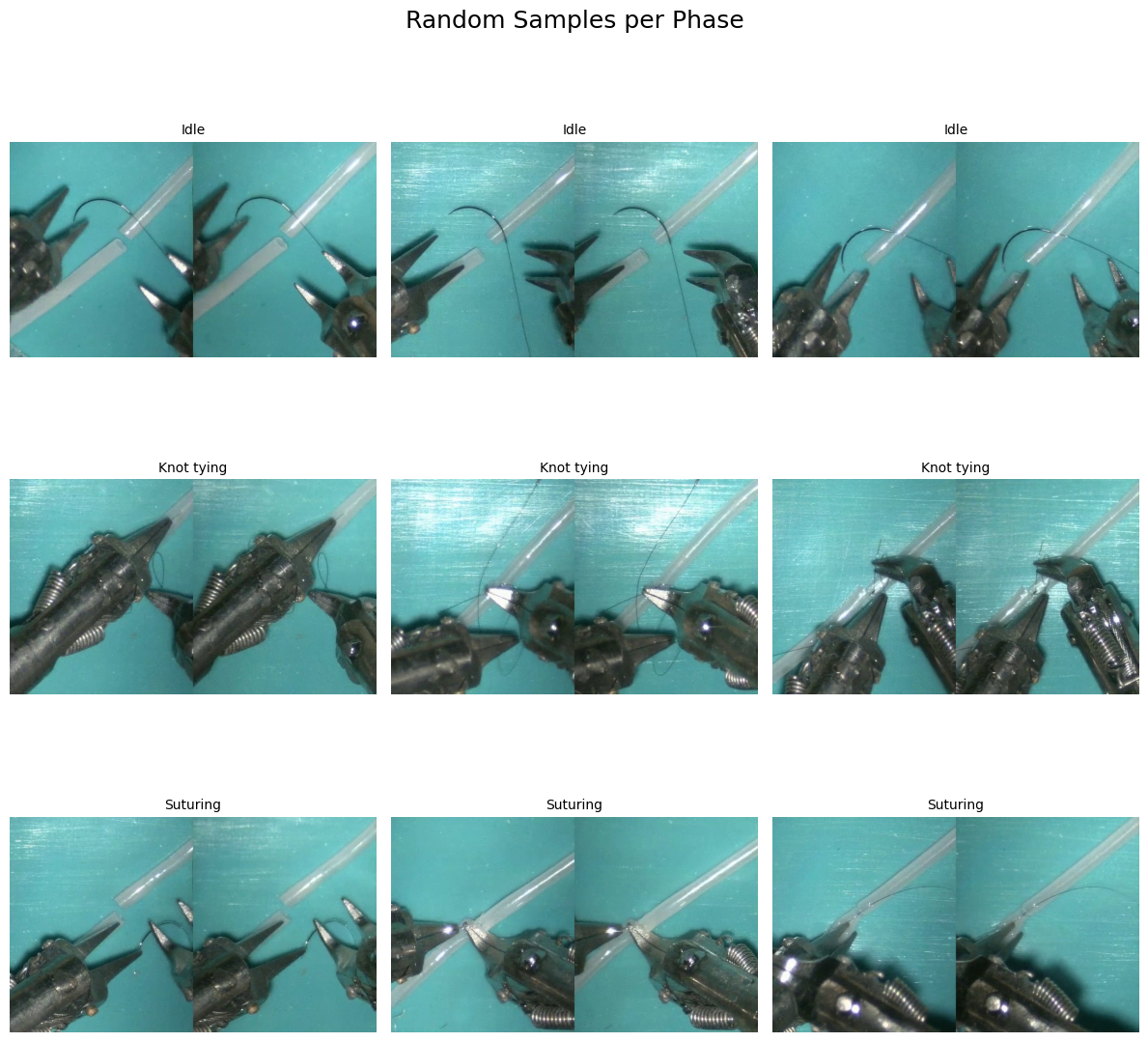
📁 Converting to COCO-style Format
This section creates a new structure suitable for COCO-style datasets used in deep learning. It includes:
MISAW_coco/
  ├── Frames/
  │     └── video1_frame_0000.jpg
  ├── annotations.json
  └── phase_to_id.json
This format is helpful for multi-label or object detection tasks.
[8]:
# --- CONFIGURATION ---

# Folder where annotation .txt files are stored
annotation_folder = 'MISAW/train/Procedural decription'

# Folder where frames are stored (e.g., MISAW/train/Frames/1_1/frame_0000.jpg)
frames_folder = 'MISAW/train/Frames'

# Output root folder for the new COCO-style dataset
output_root = 'MISAW_coco'

# Inside this, all frames will be copied to one flat "Frames" folder
frames_out_root = os.path.join(output_root, 'Frames')
os.makedirs(frames_out_root, exist_ok=True)  # Create the folder if it doesn't exist

# --- STEP 1: COLLECT UNIQUE PHASES FROM ALL ANNOTATIONS ---

# Set to store all phase names (e.g., Idle, Suturing, etc.)
all_phases = set()

# Loop through each annotation file and collect phase names
for anno_file in glob.glob(f'{annotation_folder}/*_annotation.txt'):
    df = pd.read_csv(anno_file, sep='\t')  # Load tab-separated .txt file as a DataFrame
    all_phases.update(df['Phase'].unique())  # Add unique phases to the set

# Create dictionaries to map phases to integer IDs and back
phase_to_id = {p: i for i, p in enumerate(sorted(all_phases))}  # e.g., "Suturing" → 2
id_to_phase = {i: p for p, i in phase_to_id.items()}            # e.g., 2 → "Suturing"

# --- STEP 2: BUILD JSON ENTRIES AND COPY FRAMES ---

entries = []  # This will hold all annotation entries

# Process each video annotation
for anno_file in glob.glob(f'{annotation_folder}/*_annotation.txt'):
    video_id = os.path.basename(anno_file).replace('_annotation.txt', '')  # e.g., "1_1"

    # Read annotation file
    df = pd.read_csv(anno_file, sep='\t')

    # Resample phase labels to match saved frames (e.g., take every 120th label)
    phases = df['Phase'].tolist()[::resample_rate]

    # Get list of resampled frame image paths
    frame_dir = os.path.join(frames_folder, video_id)
    frame_paths = sorted(glob.glob(os.path.join(frame_dir, '*.jpg')))

    # Ensure the number of frames and labels match
    if len(phases) != len(frame_paths):
        print(f"⚠️ Skipping {video_id}: mismatched {len(phases)} labels vs {len(frame_paths)} frames")
        continue

    # Loop over each frame-label pair
    for i, (frame_path, phase) in enumerate(zip(frame_paths, phases)):
        # Create a new frame name (e.g., "1_1_frame_0003.jpg")
        new_frame_name = f"{video_id}_frame_{i:04d}.jpg"

        # Full destination path for the copied frame
        new_frame_path = os.path.join(frames_out_root, new_frame_name)

        # Copy frame to the output folder
        shutil.copy(frame_path, new_frame_path)

        # Add a dictionary entry for this frame in COCO-style format
        entries.append({
            "video": video_id,
            "frame": new_frame_name,
            "path": new_frame_path,
            "label": phase,
            "label_id": phase_to_id[phase]
        })

# --- STEP 3: SAVE TO DISK ---

# Save all frame annotations to a JSON file
with open(os.path.join(output_root, 'annotations.json'), 'w') as f:
    json.dump(entries, f, indent=2)

# Save the phase-to-ID mapping for future use
with open(os.path.join(output_root, 'phase_to_id.json'), 'w') as f:
    json.dump(phase_to_id, f, indent=2)

# Final confirmation
print(f"✅ COCO-style structure created in {output_root}/ with {len(entries)} annotated frames.")
✅ COCO-style structure created in MISAW_coco/ with 4286 annotated frames.
Training
[9]:
from torch.utils.data import Dataset
from PIL import Image

class MISAWDataset(Dataset):
    def __init__(self, annotations, transform=None):
        self.annotations = annotations
        self.transform = transform

    def __len__(self):
        return len(self.annotations)

    def __getitem__(self, idx):
        item = self.annotations[idx]
        # image in gray scale
        image = Image.open(item['path']).convert('L')
        # get the label id: 0,1,...
        label = item['label_id']

        if self.transform:
            image = self.transform(image)

        return image, label
[28]:
import json
import torch
from torch.utils.data import DataLoader, Subset
from torchvision import transforms
from collections import defaultdict

# Load annotations from JSON
with open('MISAW_coco/annotations.json') as f:
    annotations = json.load(f)

# Create dataset object with optional transforms and resize to 128×128
transform = transforms.Compose([
    transforms.ToTensor(),
    transforms.Grayscale(),                         # Ensures image is 1-channel
    transforms.Normalize((0.5,), (0.5,)),           # Adjust if using RGB → (0.5, 0.5, 0.5)
    transforms.Resize((128, 128))
])

dataset = MISAWDataset(annotations, transform=transform)

# === Deterministic split based on 'video' field ===

# Group dataset indices by video
video_to_indices = defaultdict(list)
for idx, image_info in enumerate(annotations):
    video_name = image_info["video"]                # e.g., "1_3"
    video_to_indices[video_name].append(idx)

# Split videos deterministically (80% train, 20% val)
all_videos = sorted(video_to_indices.keys())
split_idx = int(len(all_videos) * 0.8)
train_videos = all_videos[:split_idx]
val_videos = all_videos[split_idx:]

# Collect dataset indices
train_indices = [idx for vid in train_videos for idx in video_to_indices[vid]]
val_indices = [idx for vid in val_videos for idx in video_to_indices[vid]]

# Create subsets
train_set = Subset(dataset, train_indices)
val_set = Subset(dataset, val_indices)

# Define dataloaders
BATCH_SIZE = 32
NUM_WORKERS = 2
LR = 1e-5
EPOCHS = 500

train_loader = DataLoader(train_set, batch_size=BATCH_SIZE, shuffle=True, num_workers=NUM_WORKERS)
val_loader = DataLoader(val_set, batch_size=BATCH_SIZE, shuffle=False, num_workers=NUM_WORKERS)

print(f"Train videos: {train_videos}")
print(f"Val videos: {val_videos}")
print(f"Train samples: {len(train_set)} | Val samples: {len(val_set)}")
Train videos: ['1_1', '1_2', '1_3', '1_4', '2_1', '2_2', '2_3', '2_4', '2_5', '2_6', '3_1', '3_2', '3_3']
Val videos: ['6_1', '6_2', '6_3', '6_4']
Train samples: 3574 | Val samples: 712
[29]:
# 🔍 Visualize examples of each digit
classes = list(range(3))
samples_per_class = {c: None for c in classes}

for img, label in dataset:
    if samples_per_class[label] is None:
        samples_per_class[label] = img
    if all(v is not None for v in samples_per_class.values()):
        break

fig, axes = plt.subplots(1, 3, figsize=(15, 2))
for i, ax in enumerate(axes):
    ax.imshow(samples_per_class[i].squeeze(0), cmap="gray")
    ax.set_title(f"Class {i}")
    ax.axis("off")
plt.show()

[30]:
# This class implements a simple Convolutional Neural Network (CNN)
# using the PyTorch Lightning framework, which simplifies training, validation,
# and testing loops by abstracting away boilerplate.

class LitCNN(LightningModule):
    def __init__(self):
        super().__init__()
        self.save_hyperparameters()  # Saves arguments to `hparams` for reproducibility and checkpointing

        # Define the CNN architecture using nn.Sequential for readability.
        # This network is designed for grayscale (1-channel) 28x28 images (e.g., MNIST).
        self.model = nn.Sequential(
            nn.Conv2d(1, 32, kernel_size=3, stride=1, padding=1),  # → [32, 128, 128]
            nn.ReLU(),
            nn.MaxPool2d(kernel_size=2),                           # → [32, 64, 64]

            nn.Conv2d(32, 64, kernel_size=3, stride=1, padding=1), # → [64, 64, 64]
            nn.ReLU(),
            nn.MaxPool2d(kernel_size=2),                           # → [64, 32, 32]

            nn.Conv2d(64, 128, kernel_size=3, stride=1, padding=1),# → [128, 32, 32]
            nn.ReLU(),
            nn.MaxPool2d(kernel_size=2),                           # → [128, 16, 16]

            nn.Flatten(),                                          # → [128 * 16 * 16] = [32768]
            nn.Linear(128 * 16 * 16, 256),
            nn.ReLU(),
            nn.Linear(256, 3)                                      # 3-class classification
        )

        # Accuracy metric for classification, supports multiclass tasks
        self.accuracy = torchmetrics.Accuracy(task="multiclass", num_classes=3)

    def forward(self, x):
        # Forward pass through the model
        return self.model(x)

    def configure_optimizers(self):
        # Use the Adam optimizer with a learning rate defined externally (LR)
        return torch.optim.Adam(self.parameters(), lr=LR)

    def training_step(self, batch, batch_idx):
        # One training step:
        # - batch contains (x, y): input images and their corresponding labels
        # - Compute predictions and loss
        # - Log the loss and accuracy
        x, y = batch
        y_hat = self(x)                                 # Forward pass
        loss = nn.CrossEntropyLoss()(y_hat, y)          # Compute cross-entropy loss
        acc = self.accuracy(y_hat, y)                   # Compute accuracy
        self.log("train_loss", loss, on_step=False, on_epoch=True)  # Log loss for epoch
        self.log("train_acc", acc, on_step=False, on_epoch=True)    # Log accuracy for epoch
        return loss

    def validation_step(self, batch, batch_idx):
        # Validation step is similar to training, but usually no gradients are computed
        # Metrics are logged for monitoring generalization
        x, y = batch
        y_hat = self(x)
        loss = nn.CrossEntropyLoss()(y_hat, y)
        acc = self.accuracy(y_hat, y)
        self.log("val_loss", loss, on_step=False, on_epoch=True)
        self.log("val_acc", acc, on_step=False, on_epoch=True)

    def test_step(self, batch, batch_idx):
        # Test step is similar to validation, used for final evaluation
        x, y = batch
        y_hat = self(x)
        loss = nn.CrossEntropyLoss()(y_hat, y)
        acc = self.accuracy(y_hat, y)
        self.log("test_loss", loss)
        self.log("test_acc", acc)
[31]:
from torchvision.models import resnet18

class LitResNet18(LightningModule):
    def __init__(self):
        super().__init__()
        self.save_hyperparameters()

        # Load pretrained ResNet-18 and adapt for grayscale + 3-class output
        self.model = resnet18(pretrained=True)  # Set True if using pretrained weights

        # Modify input layer to accept 1-channel (grayscale) input
        self.model.conv1 = nn.Conv2d(1, 64, kernel_size=7, stride=2, padding=3, bias=False)

        # Replace final FC layer to output 3 classes
        self.model.fc = nn.Linear(self.model.fc.in_features, 3)

        # Accuracy metric
        self.accuracy = torchmetrics.Accuracy(task="multiclass", num_classes=3)

    def forward(self, x):
        return self.model(x)

    def configure_optimizers(self):
        return torch.optim.Adam(self.parameters(), lr=LR)

    def training_step(self, batch, batch_idx):
        x, y = batch
        y_hat = self(x)
        loss = nn.CrossEntropyLoss()(y_hat, y)
        acc = self.accuracy(y_hat, y)
        self.log("train_loss", loss, on_step=False, on_epoch=True)
        self.log("train_acc", acc, on_step=False, on_epoch=True)
        return loss

    def validation_step(self, batch, batch_idx):
        x, y = batch
        y_hat = self(x)
        loss = nn.CrossEntropyLoss()(y_hat, y)
        acc = self.accuracy(y_hat, y)
        self.log("val_loss", loss, on_step=False, on_epoch=True)
        self.log("val_acc", acc, on_step=False, on_epoch=True)

    def test_step(self, batch, batch_idx):
        x, y = batch
        y_hat = self(x)
        loss = nn.CrossEntropyLoss()(y_hat, y)
        acc = self.accuracy(y_hat, y)
        self.log("test_loss", loss)
        self.log("test_acc", acc)
[32]:
#create directory tb_logs
!mkdir -p tb_logs/

%load_ext tensorboard
%tensorboard --logdir tb_logs/
The tensorboard extension is already loaded. To reload it, use:
  %reload_ext tensorboard
[26]:
# 🚂 Training
model = LitCNN()

# Initialize TensorBoardLogger
logger = TensorBoardLogger("tb_logs", name="LitCNN")

# Initialize EarlyStopping and ModelCheckpoint callbacks
early_stop_callback = EarlyStopping(
    monitor="val_loss", patience=20, mode="min", verbose=True
)

checkpoint_callback = ModelCheckpoint(
    monitor="val_loss", mode="min", save_top_k=1, verbose=True, dirpath="checkpoints/"
)

trainer = Trainer(max_epochs=EPOCHS,
                  accelerator="auto",
                  devices="auto",
                  log_every_n_steps=1,  # ✅ log at every step
                  logger=logger,  # Log to TensorBoard
                  callbacks=[early_stop_callback, checkpoint_callback]  # Add callbacks here
)
trainer.fit(model, train_loader, val_loader)
INFO:pytorch_lightning.utilities.rank_zero:GPU available: True (cuda), used: True
INFO:pytorch_lightning.utilities.rank_zero:TPU available: False, using: 0 TPU cores
INFO:pytorch_lightning.utilities.rank_zero:HPU available: False, using: 0 HPUs
/usr/local/lib/python3.11/dist-packages/pytorch_lightning/callbacks/model_checkpoint.py:654: Checkpoint directory /content/checkpoints exists and is not empty.
INFO:pytorch_lightning.accelerators.cuda:LOCAL_RANK: 0 - CUDA_VISIBLE_DEVICES: [0]
INFO:pytorch_lightning.callbacks.model_summary:
  | Name     | Type               | Params | Mode
--------------------------------------------------------
0 | model    | Sequential         | 8.5 M  | train
1 | accuracy | MulticlassAccuracy | 0      | train
--------------------------------------------------------
8.5 M     Trainable params
0         Non-trainable params
8.5 M     Total params
33.929    Total estimated model params size (MB)
15        Modules in train mode
0         Modules in eval mode
INFO:pytorch_lightning.callbacks.early_stopping:Metric val_loss improved. New best score: 0.820
INFO:pytorch_lightning.utilities.rank_zero:Epoch 0, global step 447: 'val_loss' reached 0.82031 (best 0.82031), saving model to '/content/checkpoints/epoch=0-step=447-v1.ckpt' as top 1
INFO:pytorch_lightning.utilities.rank_zero:Epoch 1, global step 894: 'val_loss' was not in top 1
INFO:pytorch_lightning.utilities.rank_zero:Epoch 2, global step 1341: 'val_loss' was not in top 1
INFO:pytorch_lightning.utilities.rank_zero:Epoch 3, global step 1788: 'val_loss' was not in top 1
INFO:pytorch_lightning.utilities.rank_zero:Epoch 4, global step 2235: 'val_loss' was not in top 1
INFO:pytorch_lightning.utilities.rank_zero:Epoch 5, global step 2682: 'val_loss' was not in top 1
INFO:pytorch_lightning.utilities.rank_zero:Epoch 6, global step 3129: 'val_loss' was not in top 1
INFO:pytorch_lightning.utilities.rank_zero:Epoch 7, global step 3576: 'val_loss' was not in top 1
INFO:pytorch_lightning.utilities.rank_zero:Epoch 8, global step 4023: 'val_loss' was not in top 1
INFO:pytorch_lightning.utilities.rank_zero:Epoch 9, global step 4470: 'val_loss' was not in top 1
INFO:pytorch_lightning.utilities.rank_zero:Epoch 10, global step 4917: 'val_loss' was not in top 1
INFO:pytorch_lightning.utilities.rank_zero:Epoch 11, global step 5364: 'val_loss' was not in top 1
INFO:pytorch_lightning.utilities.rank_zero:Epoch 12, global step 5811: 'val_loss' was not in top 1
INFO:pytorch_lightning.utilities.rank_zero:Epoch 13, global step 6258: 'val_loss' was not in top 1
INFO:pytorch_lightning.utilities.rank_zero:Epoch 14, global step 6705: 'val_loss' was not in top 1
INFO:pytorch_lightning.utilities.rank_zero:Epoch 15, global step 7152: 'val_loss' was not in top 1
INFO:pytorch_lightning.utilities.rank_zero:Epoch 16, global step 7599: 'val_loss' was not in top 1
INFO:pytorch_lightning.utilities.rank_zero:Epoch 17, global step 8046: 'val_loss' was not in top 1
INFO:pytorch_lightning.utilities.rank_zero:Epoch 18, global step 8493: 'val_loss' was not in top 1
INFO:pytorch_lightning.utilities.rank_zero:Epoch 19, global step 8940: 'val_loss' was not in top 1
INFO:pytorch_lightning.callbacks.early_stopping:Monitored metric val_loss did not improve in the last 20 records. Best score: 0.820. Signaling Trainer to stop.
INFO:pytorch_lightning.utilities.rank_zero:Epoch 20, global step 9387: 'val_loss' was not in top 1
[ ]:
# 🚂 Training
model = LitResNet18()

# Initialize TensorBoardLogger
logger = TensorBoardLogger("tb_logs", name="LitResNet18")

# Initialize EarlyStopping and ModelCheckpoint callbacks
early_stop_callback = EarlyStopping(
    monitor="val_loss", patience=20, mode="min", verbose=True
)

checkpoint_callback = ModelCheckpoint(
    monitor="val_loss", mode="min", save_top_k=1, verbose=True, dirpath="checkpoints/"
)

trainer = Trainer(max_epochs=EPOCHS,
                  accelerator="auto",
                  devices="auto",
                  log_every_n_steps=1,  # ✅ log at every step
                  logger=logger,  # Log to TensorBoard
                  callbacks=[early_stop_callback, checkpoint_callback]  # Add callbacks here
)
trainer.fit(model, train_loader, val_loader)
/usr/local/lib/python3.11/dist-packages/torchvision/models/_utils.py:208: UserWarning: The parameter 'pretrained' is deprecated since 0.13 and may be removed in the future, please use 'weights' instead.
  warnings.warn(
/usr/local/lib/python3.11/dist-packages/torchvision/models/_utils.py:223: UserWarning: Arguments other than a weight enum or `None` for 'weights' are deprecated since 0.13 and may be removed in the future. The current behavior is equivalent to passing `weights=ResNet18_Weights.IMAGENET1K_V1`. You can also use `weights=ResNet18_Weights.DEFAULT` to get the most up-to-date weights.
  warnings.warn(msg)
INFO:pytorch_lightning.utilities.rank_zero:GPU available: True (cuda), used: True
INFO:pytorch_lightning.utilities.rank_zero:TPU available: False, using: 0 TPU cores
INFO:pytorch_lightning.utilities.rank_zero:HPU available: False, using: 0 HPUs
/usr/local/lib/python3.11/dist-packages/pytorch_lightning/callbacks/model_checkpoint.py:654: Checkpoint directory /content/checkpoints exists and is not empty.
INFO:pytorch_lightning.accelerators.cuda:LOCAL_RANK: 0 - CUDA_VISIBLE_DEVICES: [0]
INFO:pytorch_lightning.callbacks.model_summary:
  | Name     | Type               | Params | Mode
--------------------------------------------------------
0 | model    | ResNet             | 11.2 M | train
1 | accuracy | MulticlassAccuracy | 0      | train
--------------------------------------------------------
11.2 M    Trainable params
0         Non-trainable params
11.2 M    Total params
44.687    Total estimated model params size (MB)
69        Modules in train mode
0         Modules in eval mode
INFO:pytorch_lightning.callbacks.early_stopping:Metric val_loss improved. New best score: 0.901
INFO:pytorch_lightning.utilities.rank_zero:Epoch 0, global step 112: 'val_loss' reached 0.90104 (best 0.90104), saving model to '/content/checkpoints/epoch=0-step=112.ckpt' as top 1
INFO:pytorch_lightning.callbacks.early_stopping:Metric val_loss improved by 0.033 >= min_delta = 0.0. New best score: 0.868
INFO:pytorch_lightning.utilities.rank_zero:Epoch 1, global step 224: 'val_loss' reached 0.86837 (best 0.86837), saving model to '/content/checkpoints/epoch=1-step=224.ckpt' as top 1
INFO:pytorch_lightning.callbacks.early_stopping:Metric val_loss improved by 0.002 >= min_delta = 0.0. New best score: 0.866
INFO:pytorch_lightning.utilities.rank_zero:Epoch 2, global step 336: 'val_loss' reached 0.86644 (best 0.86644), saving model to '/content/checkpoints/epoch=2-step=336.ckpt' as top 1
[ ]: